
Deploy website projects faster and easier than FTP.
Beam combines publish, server backup, and rollback-ready releases in one clear workflow, with resumable uploads.
Shipping should feel fast
Traditional FTP deployments choke on thousands of small files. Every connection, every handshake, every file adds overhead.
Beam packages your project and deploys it as a streamlined transfer — so what takes minutes with FTP often takes seconds instead. Speed depends on your upload bandwidth, not on file count.
You get fast publishing without sacrificing control.
- Thousands of small files? Deploy in one optimized transfer instead of 10,000 slow ones.
- Interrupted upload? Resume instead of restarting.
- Need a fallback? Roll back in seconds.
- Risky release? Create a full server backup first.
- Working on multiple Macs? Keep project configs in sync.
FTP transfers files individually. Beam deploys projects efficiently as a compressed package and extracts them server-side.
Beam is not a full website backup solution.
It creates backups of your webroot and lets you switch between deployments. However, it does not back up databases.
Everything you need for reliable website releases
Fast Publish
Upload and activate releases quickly with clear status feedback at every stage.
Full Webroot Backup
Create complete server backups before high-risk changes.
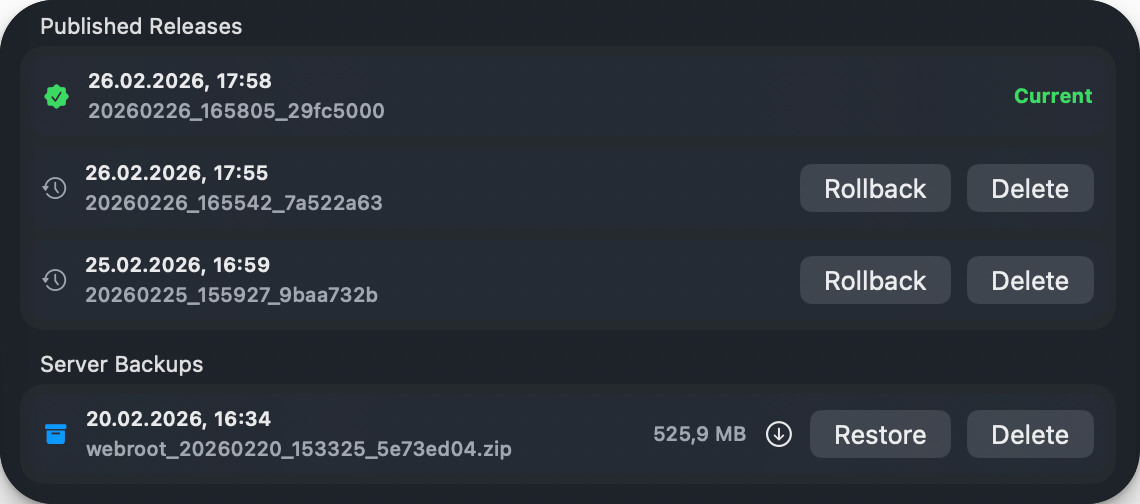
Rollback & Release History
Restore a previous release instantly when something goes wrong.
Resumable Uploads
Network hiccups do not force a full restart.
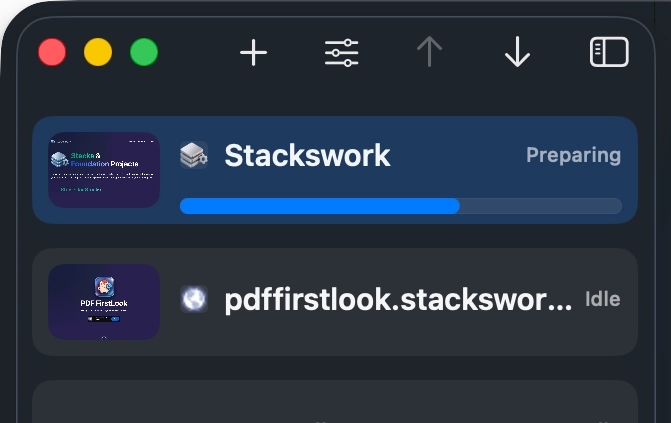
Real Progress Visibility
See what Beam is doing: preparing, uploading, finalizing, activating.
Hotfolder
Simplky define a hotfolder and publish. Done.
Notifications
Export your website and go on with your work. You will be notified if the upload is done.
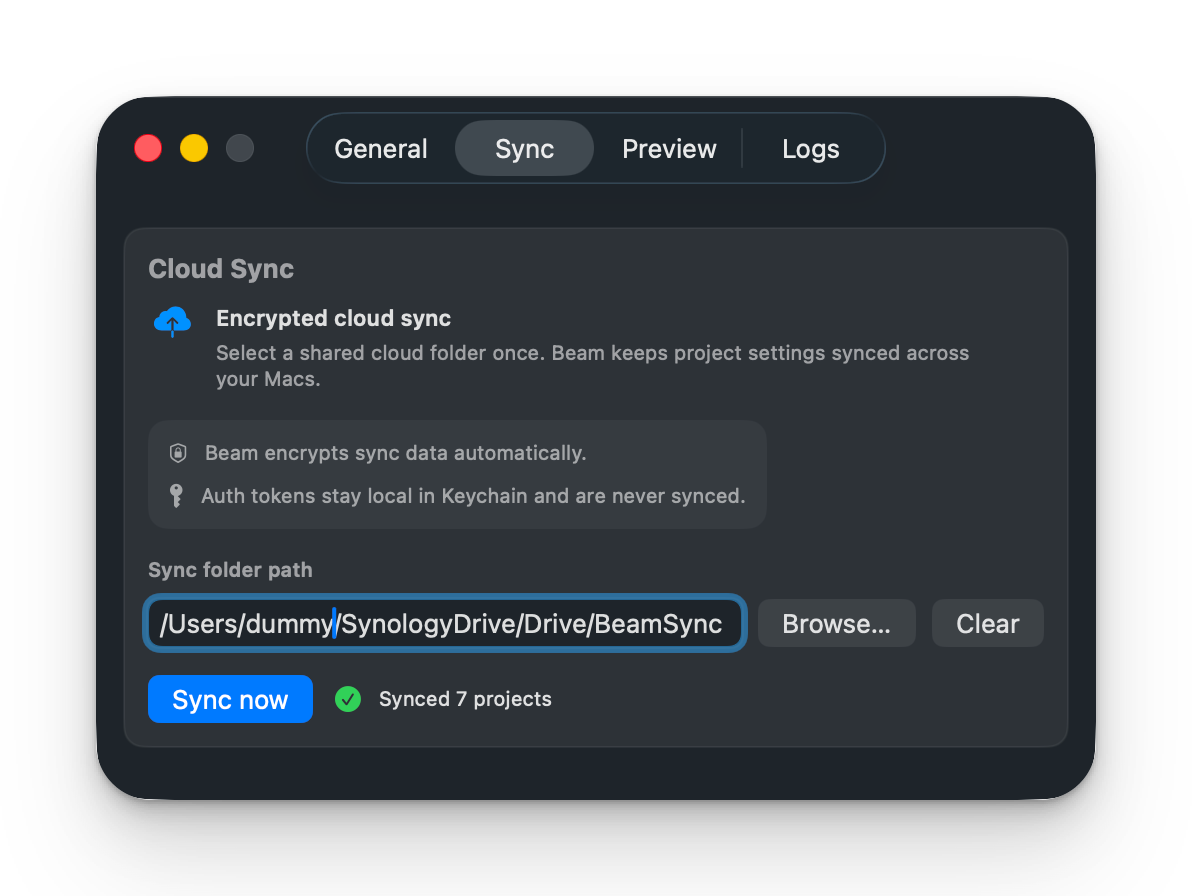
Multi‑Mac Configuration Sync
Keep project setup aligned across your devices.
How It Works
1
Connect
Add your project and install the Helper via FTP.
2
Choose Action
Pick Publish, Full Backup, or Both.
3
Ship Safely
Deploy with progress tracking, release history, and rollback options ready.
Built for recovery, not just delivery
Beam treats deployment as a lifecycle, not a single upload.
You can back up first, deploy confidently, and recover fast if production behavior changes unexpectedly.
Great for agencies managing many client sites
Beam helps standardize deployment quality across projects and team members:
- consistent workflow
- fewer release surprises
- faster incident - recovery
- less manual coordination
FAQ
- How much is the app?
The Price is for 2 Seats. If you need more seats, simply purchase more licenses.
- Who is Beam for?
Beam is for developers, freelancers, and agencies deploying websites regularly from a folder on macOS.
- What can Beam be used for?
Beam is designed for people who publish websites to their own hosting and want a faster and more reliable workflow than traditional FTP tools.
It works especially well for:
Static websites
Projects built with tools like RapidWeaver, static site generators, or exported HTML projects often contain many small files. Beam can deploy these sites significantly faster than FTP.
Client websites
If you manage multiple client projects, Beam makes releases easier. You can publish updates quickly and keep a clear workflow for deployments.
Website updates and releases
Beam is ideal when you regularly push new versions of a site to production and want the process to be fast, predictable, and easy to repeat.
Agencies and freelancers
Designers and small agencies working with standard web hosting can use Beam to simplify and speed up their publishing workflow.
Projects with many small files
Websites with lots of assets like images, scripts, and stylesheets benefit the most, because Beam avoids the overhead of thousands of individual FTP transfers.
In short, Beam is built for anyone who wants a faster and clearer way to publish websites to regular web hosting.
- Why is it faster?
Traditional FTP tools upload websites file by file. Modern websites often contain hundreds or even thousands of small files, and every single file requires a separate connection step, confirmation, and transfer. This creates a lot of overhead and makes deployments unnecessarily slow.
Beam uses a different approach.
Instead of transferring thousands of individual files, Beam prepares your website as a single optimized upload package and transfers it in one continuous stream. This drastically reduces connection overhead and allows the upload to use the full available bandwidth.
Once the upload is complete, Beam extracts the package directly on the server and publishes the new version.
What this means in practice
- significantly faster uploads
- no waiting for thousands of tiny file transfers
- more reliable deployments
- a clearer release workflow
For larger projects, deployments that would normally take several minutes with FTP can often be completed in seconds with Beam.
- Does Beam replace FTP completely?
Beam is designed to replace FTP for publishing websites. Instead of transferring files one by one, Beam uploads your project as a deployment package and releases it on the server.
For tasks like quick manual edits or browsing server files, traditional FTP tools can still be useful. But for deploying a complete website, Beam is usually much faster and more reliable.
- Do I need special server software?
No. Beam works with standard web hosting.
The server only needs basic capabilities that almost every hosting provider already supports. This makes Beam suitable for typical hosting environments used by freelancers, agencies, and client projects.
- Will Beam work with my website builder?
Beam works with any tool that exports a website as files.
This includes tools like:
- RapidWeaver
- static site generators
- exported HTML websites
- many CMS setups that publish static output
If your workflow produces a folder with the final website files, Beam can deploy it.
- Can I try Beam before buying?
Yes.
Beam includes one free project, so you can try the full workflow.
This allows you to test how Beam works with your hosting, see the speed difference compared to FTP, and decide if it fits your workflow.
If you manage more projects, you can upgrade later and add additional deployments.
- Can I create backups before deploy?
Yes. You can run a full server backup only, or run backup and publish in one flow.
- What happens if upload is interrupted?
Beam supports resumable uploads, so you continue where it stopped.
- Can I roll back quickly?
Yes. Beam keeps release history so you can reactivate a previous release.
- Does Beam support multi-Mac workflows?
Yes. Project configuration can be synchronized across Macs.
- Which macOS version is required?
Beam is designed for macOS 13.0 (Ventura)
Beam is built for people who publish websites to real web servers.
Made for RapidWeaver, Blocs, Mobirise, Nicepage and exported folder workflows
If you work with RapidWeaver Classic, RapidWeaver Elements, Stacks, Blocs, Mobirise, Nicepage Desktop, or export to folder from tools like Pinegrow, Beam gives you a faster, cleaner and more reliable deployment workflow than traditional FTP apps.
Works great with:
RapidWeaver Classic • RapidWeaver Elements • Stacks · Blocs • Mobirise • Nicepage Desktop • Pinegrow projects • static HTML exports
⭐
⭐
⭐
⭐
⭐
Matthias Wolf
Beam significantly speeds up my RapidWeaver uploads—often by a factor of 2 to 4. Instead of transferring many individual files, zipped “chunks” are sent and unpacked on the server side, which saves a lot of time, especially for projects with many individual files (e.g., TCMS3). Once the setup is complete, everything runs automatically in the background. The integrated backup (Webroot or individual folders) is an added bonus. Highly recommended for anyone who deploys regularly.
⭐
⭐
⭐
⭐
⭐
Dominik de Virion
Beam is amazing. It significantly speeds up the process of deploying a website to the server, and since the update to version 1.1.1, it’s been very easy to set up. It has quickly become one of those tools I can’t imagine my daily work without.